
Prerequisites
- Local login access (using mouse and monitor directly to unit) or:
- Web browser login
- Recorder and camera system setup with an AI function such as Intelligent Motion Detect (iMD), Face Recognition or Perimeter Protection IVS
What is Smart Search
For recorders and camera systems setup with AI functions such as Intelligent Motion Detect (iMD), Face Recognition or Perimeter Protection IVS, the Smart Search allows refined playback search within the specific parameters based on the Smart Function.
Accessing Smart Search
- Login using a mouse and monitor or using the web browser interface.
- In the Main Menu, select Playback then Advanced Search

- Select the appropriate Smart Function to search. See below image for an example:

- Once you select a function, you can fill in the parameters such as channel, start and end time as well as Event Type.
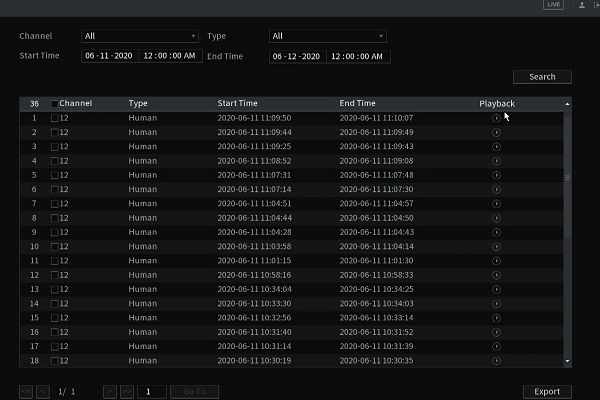
- Click Search or Smart Search. The results will display. You can double click a file to view the footage.
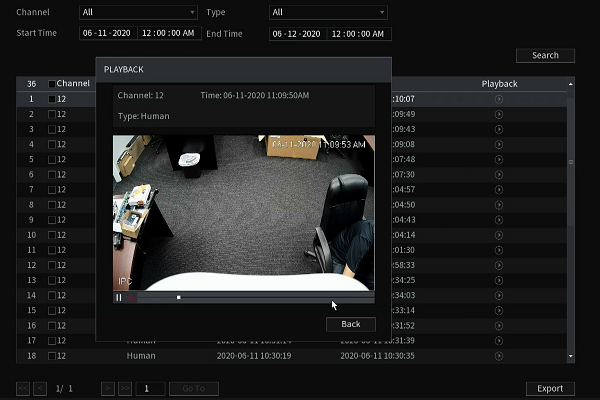
- Click "export" to backup the footage.
Comments
0 comments
Please sign in to leave a comment.