Table of Contents
Introduction
Port forwarding is a networking technique that directs incoming internet traffic to a specific device or service within a private network, allowing external access to applications like web servers, gaming servers, or remote desktops.
WAN Mode
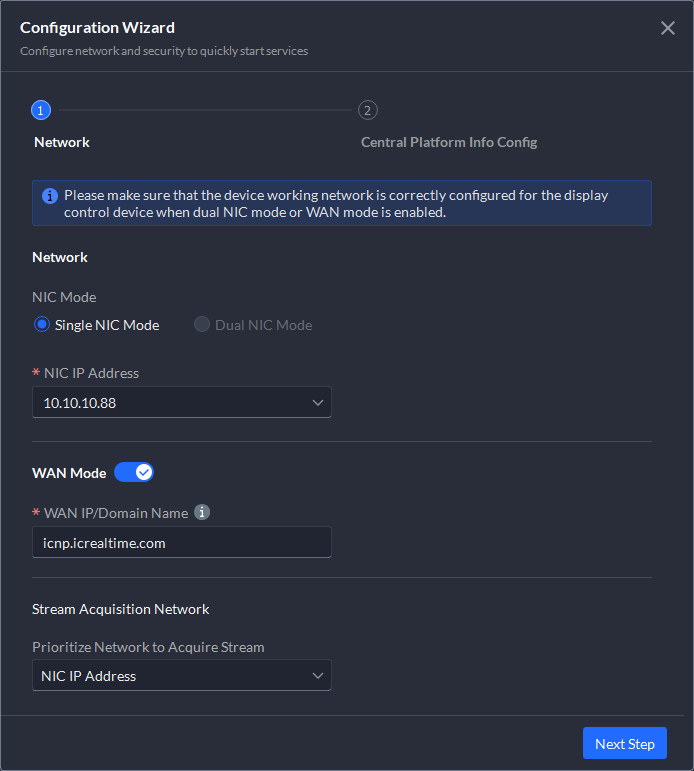
During the installation of the IC Now Pro management console on the server, if you intend to provide remote access to the server you MUST enable "WAN mode" and input either the domain name or WAN IP address. This allows the server to listen for remote connections outside of the LAN. Even if you port forward in your firewall, but do not enable "WAN Mode", the server will not allow any remote connections.
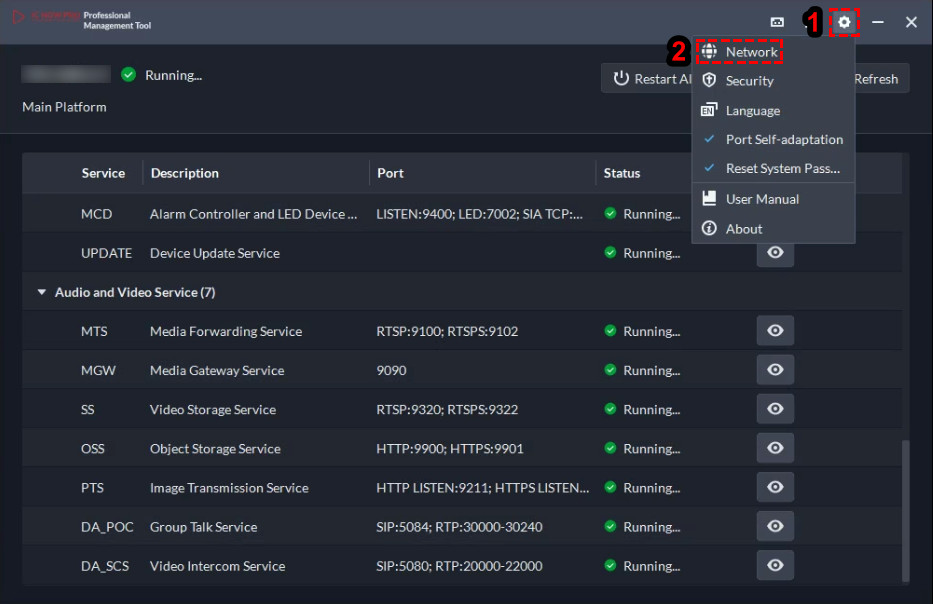
You may also enable "WAN Mode" post install via the IC Now Pro management console using the "Config & Other" button then selecting "Network".
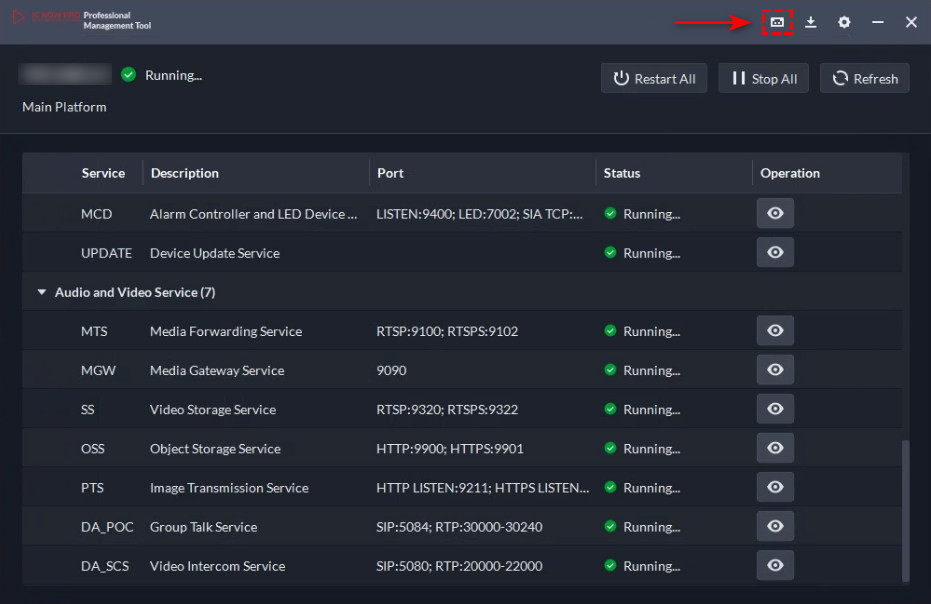
Port forwarding button
The IC Now Pro management console has the ability to let you select the list of services you would like to provide remote access to, review the ports listed, and output those ports to be forwarded into a spreadsheet that is readable by Microsoft Excel, Google Sheets or LibreOffice Calc.
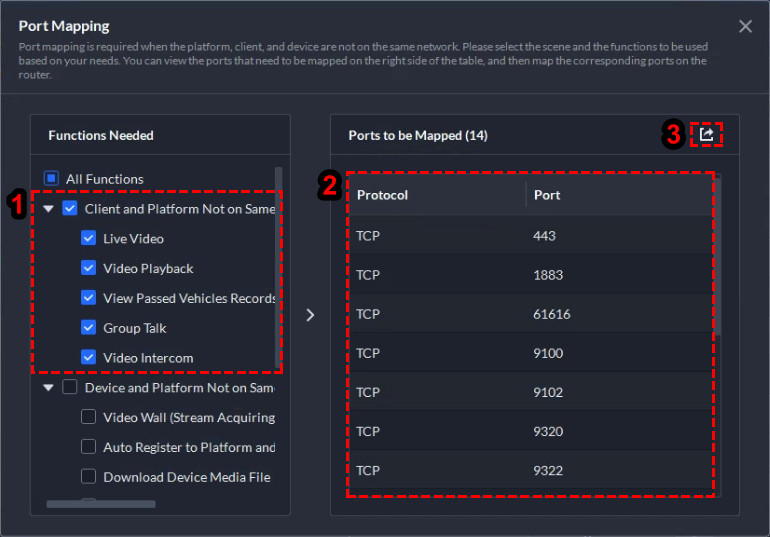
Reviewing ports and exporting
For most deployments you would perform the following steps
- Check the box for "Client & Platform Not of Same Network"
- Review and/or document the ports that would need to be forwarded
- Click the "Export" button to save the file with the select ports / functions
Example of the spreadsheet generated by the IC Now Pro management console
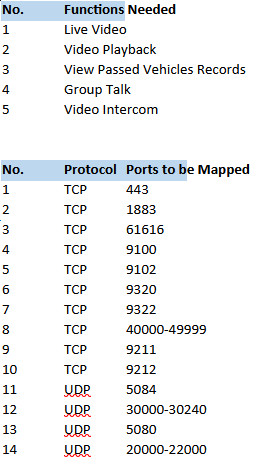
All ports used by IC Now Pro
The table below lists ALL ports that the server could utilize, but not necessarily need to be forwarded in your firewall. It is highly recommended to NOT use port redirection but direct 1:1 port forwarding.
| Service |
Protocol |
Ports |
Service |
| NGINX HTTPS (NGINX) |
TCP |
443 |
Provides access to the web server login server |
| MQ Push Notification MQTT (MQ) |
TCP |
1883 |
Sends notifications to clients and other servers |
| MQ Push Notification Openwire (MQ) |
TCP |
61616 |
Sends notifications to clients and other servers |
| Media Forwarding RTSP (MTS) |
TCP |
9100 |
Manages forwarding of live video streams |
| Media Forwarding RTSPS (MTS) |
TCP |
9102 |
Manages forwarding of live video streams |
| Video Storage Service RTSP (SS) |
TCP |
9320 |
Manages video forwarding and storage |
| Video Storage Service RTSPS (SS) |
TCP |
9322 |
Manages video forwarding and storage |
| Snapshot Transmission RTP (PTS) |
TCP |
40000-49999 |
Provides access to ANPR devices and snapshot transmission |
| Snapshot Transmission HTTP (PTS) |
TCP |
9211 |
Provides access to ANPR devices and snapshot transmission |
| Snapshot Transmission HTTPS (PTS) |
TCP |
9212 |
Provides access to ANPR devices and snapshot transmission |
| Group Talk SIP (DA POC) |
UDP |
5084 |
Intercom clustering protocol |
| Group Talk RTP (DA POC) |
UDP |
30000-30240 |
Intercom clustering protocol |
| Video Intercom SIP (DA SCS) |
UDP |
5080 |
Communication service between video intercoms with client devices |
| Video Intercom RTP (DA SCS) |
UDP |
20000-22000 |
Communication service between video intercoms with client devices |
| Media Gateway (MGW) |
TCP |
9090 |
Pulls video streams in for video walls |
| System Management Console (SMC) |
TCP |
9005 |
Device auto redirect service |
| Device Auto Registration (ARS) |
TCP |
9500 |
Auto registration of supported devices |
| Link Management (DS BSID) |
TCP |
39550-39649 |
Manages downloading images, videos, and webpage redirection of auto registering devices |
| Link Management Listen (DS BSID) |
TCP |
9399 |
Manages downloading images, videos, and webpage redirection of auto registering devices |
| Protocol Conversion Proxy (PCPS) |
UDP |
33000-35000 |
Manages access of third party video devices |
| Protocol Conversion Proxy (PCPS) |
TCP |
8686 |
Manages access of third party video devices |
| Alarm Controller TCP (MCD) |
TCP |
6666 |
Manages access of alarm controllers and LED devices |
| Alarm Controller UDP (MCD) |
UDP |
5555 |
Manages access of alarm controllers and LED devices |
| HTTP Events Notifications (SMC) |
TCP |
18801 |
Manages platform services and monitors functions |
| HTTPS Events Notifications (SMC) |
TCP |
18443 |
Manages platform services and monitors functions |
| TCP Events Notifications (SMC) |
TCP |
18800 |
Manages platform services and monitors functions |
| UDP Event Notifications (SMC) |
UDP |
18800 |
Manages platform services and monitors functions |

Comments
0 comments
Please sign in to leave a comment.