
Fire detection is triggered based on an abnormal high temperature based on the sensitivity settings. It is recommended to do a couple fire test simulations and adjust sensitivity accordingly otherwise may experience false alarms due to a lighter or hot liquids.
Fire detection has 2 different modes.
- Anti-jamming: The camera will only detect those objects that are newly high temperature in the scene and send off alarms. That means under Anti-jamming mode, a constantly high-temperature object (a boiler/water heater, for example) is excluded.
- High Response: The camera will detect any hidden fire danger and send off alarm
Setting up Fire Detection
- Log into camera’s web interface
- Settings-> Smart Thermal -> Fire Warning
*Smart Plan not required to be enabled. You can enable Smart Plan and draw IVS rules on both channels 1 and 2 and the Fire Detection will still work. - Select Enable
- Select one of the following modes that best fits the environment (Anti-Jamming or High Response)
- Adjust Sensitivity, Set Alarm Parameters, and save the settings.
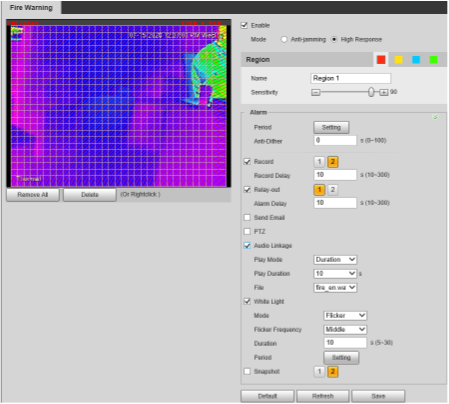
Adjusting Fire Sensitivity
These are some examples of scenarios to test when adjusting the sensitivity to reduce false positive as it will need to be adjusted for different locations.
- Have someone stand in the scene with a lighter and adjust sensitivity to lower or higher if not wanting to trigger off someone smoking
- Have someone stand in the scene with a hot cup of liquid (water or coffee) to make sure it's not triggered off a really hot drink.
- If possible light something on fire to simulate a fire (paper in a metal bin/trash can).
*This test liability is on the installer and IC Realtime is not liable in any way for this. Advise having a fire extinguisher.
Comments
0 comments
Please sign in to leave a comment.