
IC Realtime 4.0 NVR GUI Update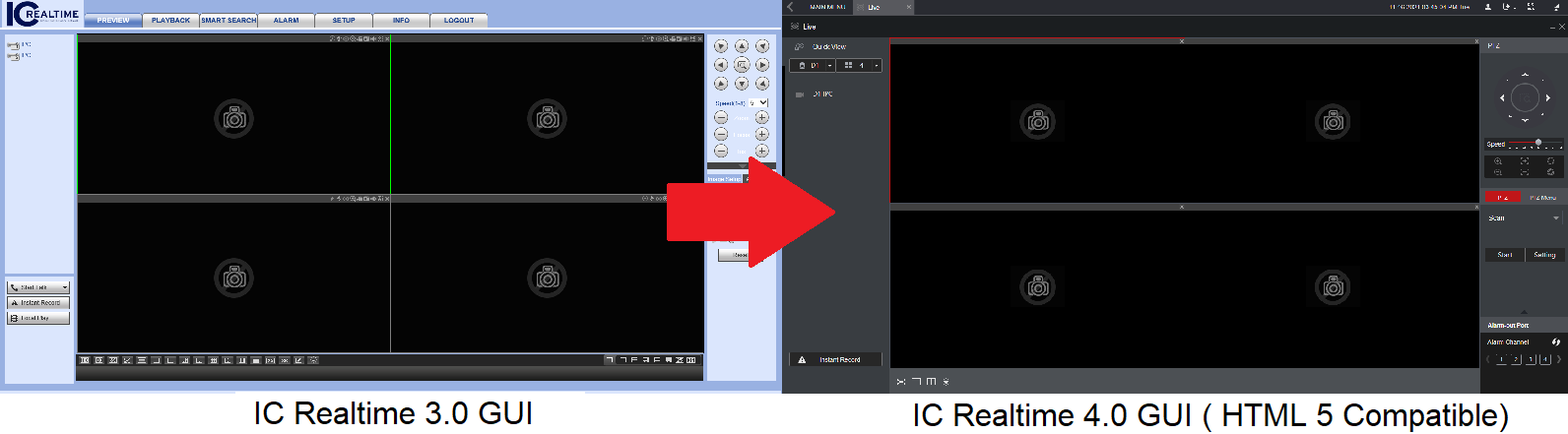
Firmware is now available for the Elite family NVRs to update the new 4.0 Interface. The newly enhanced and simplified GUI offers updated Intelligence support for newer cameras and HTML5 support for expanded web browser options. This article will cover all important information regarding updating your 3.0 interface to 4.0. For firmware update instructions, use this help article using this link. Note that any new firmware moving forward will only be available in the 4.0 Interface, and rolling back to the previous version GUI will not be possible once updated to 4.0. The firmware will be available on the product page of the appropriate recorder when logged into your IC Realtime Dealer account.
Before You Update
You will not be able to utilize exported backup files from the previous V3 platform once it has been updated to V4. A factory reset of the recorder is necessary after updating. Due to this, it is highly recommended to document the configurations on the recorder before updating from V3 to 4 GUI. These configurations include, but are not limited to:
- Network information of the recorder (IP, Subnet, DDNS, Ports, Email settings, etc.)
- User Accounts
- Smart Plan settings
- Added remote devices list (IP cameras, etc.)
- Record and schedule settings
- Display Tour Settings
- Alarm Input/ Output settings
Certain settings will carry over after the update without any action:
- PTZ, Motion Detection, or IVS configurations (These are typically saved on the camera itself)
- P2P (P2P is automatically enabled and NVR IP set to DHCP after factory reset)
- Any recordings on the Hard Drive (only a format of the Hard Drive will delete any recordings)
- RAID settings (This is typically saved on the Hard Drives. We cannot guarantee RAIDs created outside of the recommended RAID setup guide here.)
After Updating
It is necessary to factory reset the recorder after updating the 4.0 interface. Any settings or configurations that have not already been defaulted will do so. This can be found under Main Menu > Advanced Settings > System Operation > Maintenance > System Reset (tab).
Compatible Devices
See table below for firmware compatibility list
|
*Elite firmware family (Elite_V4.002.00KL500.0.R.211028) |
NVR-6032K |
**NVR-8128K | ||
| NVR-6064K | NVR-EL128-4U12MP1 | |||
*Elite family recorders are recommended to be on 2020-06-08 build date or newer before updating.
**The NVR-8128K has had different iterations of hardware over the years. If your unit is made before 2018 please check with tech support to verify that you have 4KS2 hardware.
Comments
0 comments
Please sign in to leave a comment.