
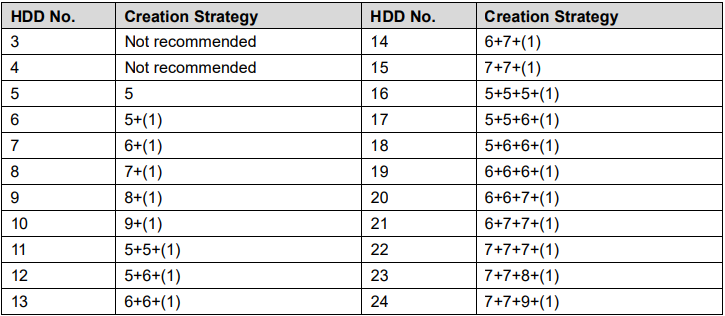
It is recommended to have your HDDs placed into multiple RAIDs instead of one large RAID. In the table below the number without "()" represents the disk number of the RAID group. The number with () represents the number of global hot spare disks. For example, for 24 HDD, the setup strategy is 7+7+9+(1). It means three RAID 5 and one hot spare, and each RAID 5 respectively contains 7 disks, 7 disks, and 9 disks.
RAID is no substitute for back-up!
All RAID levels except RAID 0 offer protection from a single drive failure. A RAID 6 system even survives 2 disks dying simultaneously. For complete data security, you still need to back-up the data from a RAID system.
- That back-up will come in handy if all drives fail simultaneously because of a power spike.
- Drives fail due to wear and tear over time.
- It is a safeguard if the storage system gets stolen.
- Back-ups can be kept off-site at a different location. This can come in handy if a natural disaster or fire destroys your workplace.
- The most important reason to back-up multiple generations of data is user error. If someone accidentally deletes some important data and this goes unnoticed for several hours, days or weeks, a good set of back-ups ensure you can still retrieve those files.
Comments
0 comments
Please sign in to leave a comment.