
TCP/IP:
- Log in to the admin account using the Config page.
- Navigate to the segment setup tab on the left.
- Inside TCP/IP is where you will set up the IP address for the Network card 1 (eh0).
- The 4 different network ports are for the different gateways you can hardline into and connect to if you need to communicate with recorders/IP cameras on different gateways. This method is call multi-address. (This setup needs to be on multi-address for hot standby or N+M setup)
Lan/Wan Mapping:
- All these ports need to be forward on the firewall of the router for the services of the ICM-7100SE to work remotely. (These ports can be modified)
- All these ports use the TCP/UDP protocol in the router's firewall setup.
- The web port is used under the HTTP protocol.
- The router address will be the external WAN IP address of your network.
Sidenote: You have the ability to go through the Quick Guide on the left for more of a basic setup quick and easy.
Server Distribution:
Hot Spare

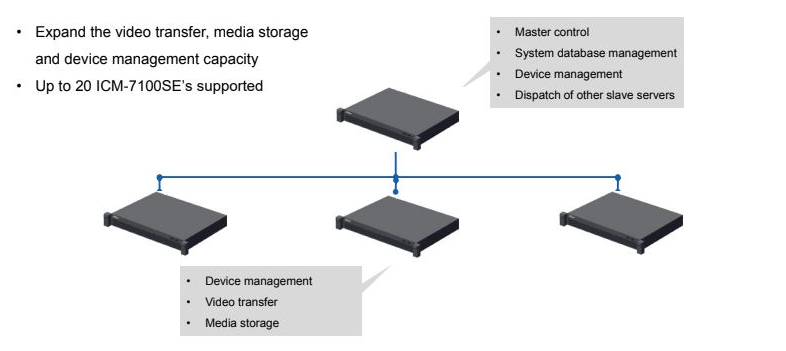
Distributed Architecture
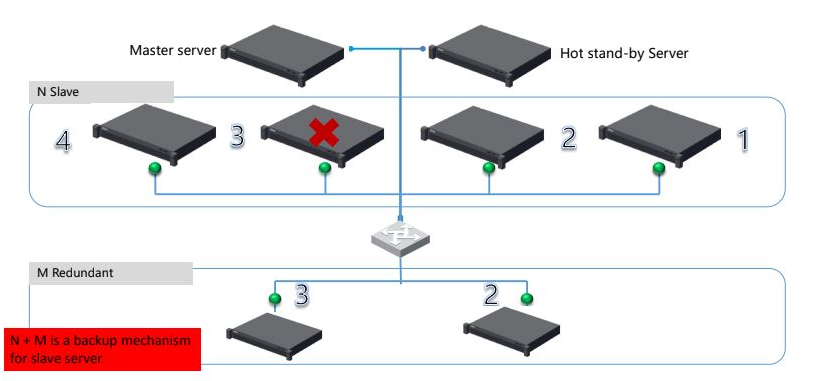
Distributed Server Architecture
The ICM-7100SE is a server that can support 20 distributes server and 5 level cascade. This is a method of stacking the server to bump up the specs of the server can handle more cameras and recorders.
Features: Hot Stand-By, Distributed Architecture, Distributed Server Architecture.
Hot Spare:
- Hot standby mode can improve the availability of the system, when the Master server fails or disconnects, the Hot stand-by server change to active mode automatically and the system keeps on working.
- Transfers data over to the master server with zero downtime.
- This solution will not upgrade the specs of the server. (Please see image to the right)
- Both servers will share a virtual Local IP for clients.
Setup:
- Inside the config system side of the server using the username 'admin'
- Go into advance setting > hot spare tab
- Virtual IP is a new LAN IP that will connect both the main server and stand by.
- Mask is for the subnet mask.
- Spare IP is the LAN 1 (main network) IP address.
- Spare beat IP is the LAN 2 IP address
- Spare config username is the 2nd server (hot stand by) username which is admin.
- Spare config password is the 2nd server (hot stand by) password. Make sure both the main server and spare have the same username and password.
ALL Networks cards need to be on multi-address
Distributed Architecture:
- Expands the video transfer, Media storage, and device management capacity.
- Up to 20 ICM-7100SE's supported on this feature.
- This method does not support Hot Standby, so if the master server fails or disconnects all the servers will also disconnect.
- Each server will have it's one local IP address, with a virtual IP for client use.
Setup:
- Inside the config system side of the server using the username 'admin'
- Go into advance setting > distribute config
- If this is the master server leave it alone. If setting up the 'slave' server then you select 'slave' and input the master server IP in the field next to 'main control server'
- Make sure both Master and slave servers have identical passwords.
Distributed Server Architecture:
- This solution will allow you to have the ability to expand the capacity of the server and also allow you to have a Hot Stand-By Server.
- This will have a Master server and one Hot standby, if anything happens to the distributed server then the M redundant server for the sales that will take over and work automatically. (example under distributed server architecture above picture)
- Server set up like this is far more complex solutions, please consult a salesperson for the best solution for your project.
Setup:
- Please contact sales to ensure you have the correct amount of servers.
- However, as long as both distributed and hot spare have been set up then go into the N+M which is in advanced setting tab.
- This will allow you to assign the correct jobs for each server. Please consult tech support for further assistance on this setup.
Comments
0 comments
Please sign in to leave a comment.